PHP2Shell was a timely reminder that if you run a self-hosted PHP website or store, keeping the underlying software patched is your job. On a managed platform, the provider patches the infrastructure. For commerce, that often means Shopify (and Shopify Plus where Plus-level needs apply).
For marketing sites, CRM and content, HubSpot is a common managed alternative to self-hosted WordPress or Drupal. Either way, you still own accounts, apps, custom code and integrations. Use our checklists to decide what fits.
On 21 October 2026, the PHP project disclosed two serious flaws now known as PHP2Shell. Security researchers reported working public exploits and attempts to use them across the industry (Vercel).
If your store or marketing site runs on Magento, WooCommerce, WordPress, Drupal or a custom PHP build on servers you manage, you'll recognise the scramble: find every place PHP is running, get it patched, then check nothing got in first. If that stack sits on a managed platform instead, the servers behind the core product weren't yours to patch.
That isn't a scare story. It's the shared responsibility model doing what it's designed to do. And it raises a fair question for ecommerce, ops and marketing leads: why keep carrying that infrastructure risk yourself when managed platforms exist?
Let's break it down.
What is PHP2Shell, in plain English?
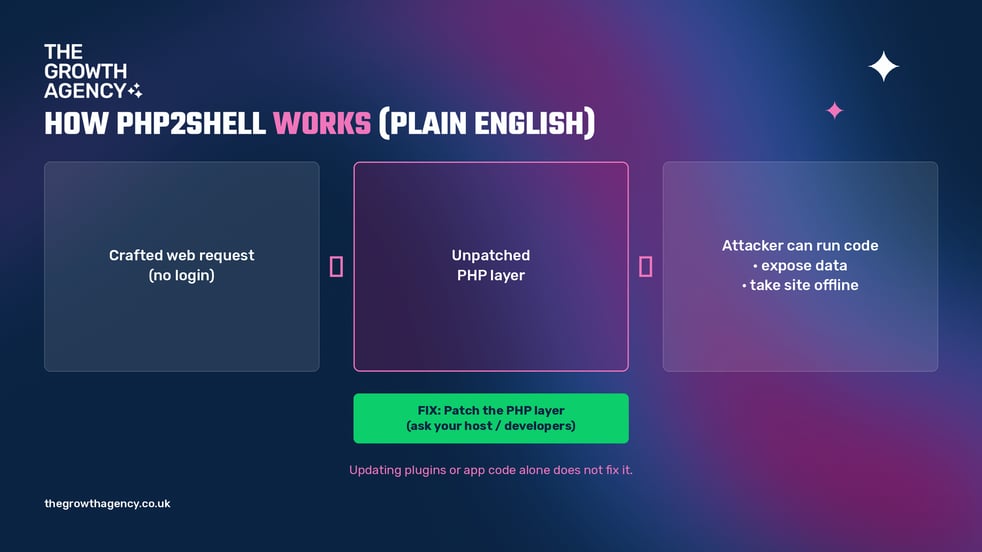
PHP2Shell is a pair of critical flaws in PHP itself — the engine that powers a huge share of websites and online stores. According to Vercel's security bulletin, a carefully crafted web request may let an attacker run their own code on your server, peek at data from other requests, or knock the site offline.
What matters for growth teams:
- No login required. Researchers rate it as a critical, pre-authentication flaw: someone does not need staff access to try it (Bitdefender).
- It hits common stacks. WordPress, Drupal, Magento and many custom PHP builds are in scope when they run on a vulnerable PHP version (Vercel).
- Some hosting setups are more exposed than others. Older Apache configurations that load PHP directly into the web server are among the highest risk (Bitdefender).
Why doesn't updating WordPress, Magento or plugins fix it?
Because the flaw isn't in your theme, plugins or storefront code. It's in the PHP layer underneath. Vercel is clear: updating your application or plugins does not fix these vulnerabilities. Your host (or your team) has to move the PHP runtime onto a patched release.
A firewall helps reduce exposure, but it is not a substitute. As PHP itself puts it, "there are no complete mitigations; updating is the only safe choice" (Bitdefender).
For custom commerce builds, there's a harder first question: how many places is PHP actually running? As Codilar points out, the storefront may look modern while the order API, B2B portal, ERP connector and admin tools still run PHP. Every one of those is yours to find and patch if you self-host.
Patch versions and older PHP branches sit in the FAQ below — useful for your developers, not the main story.
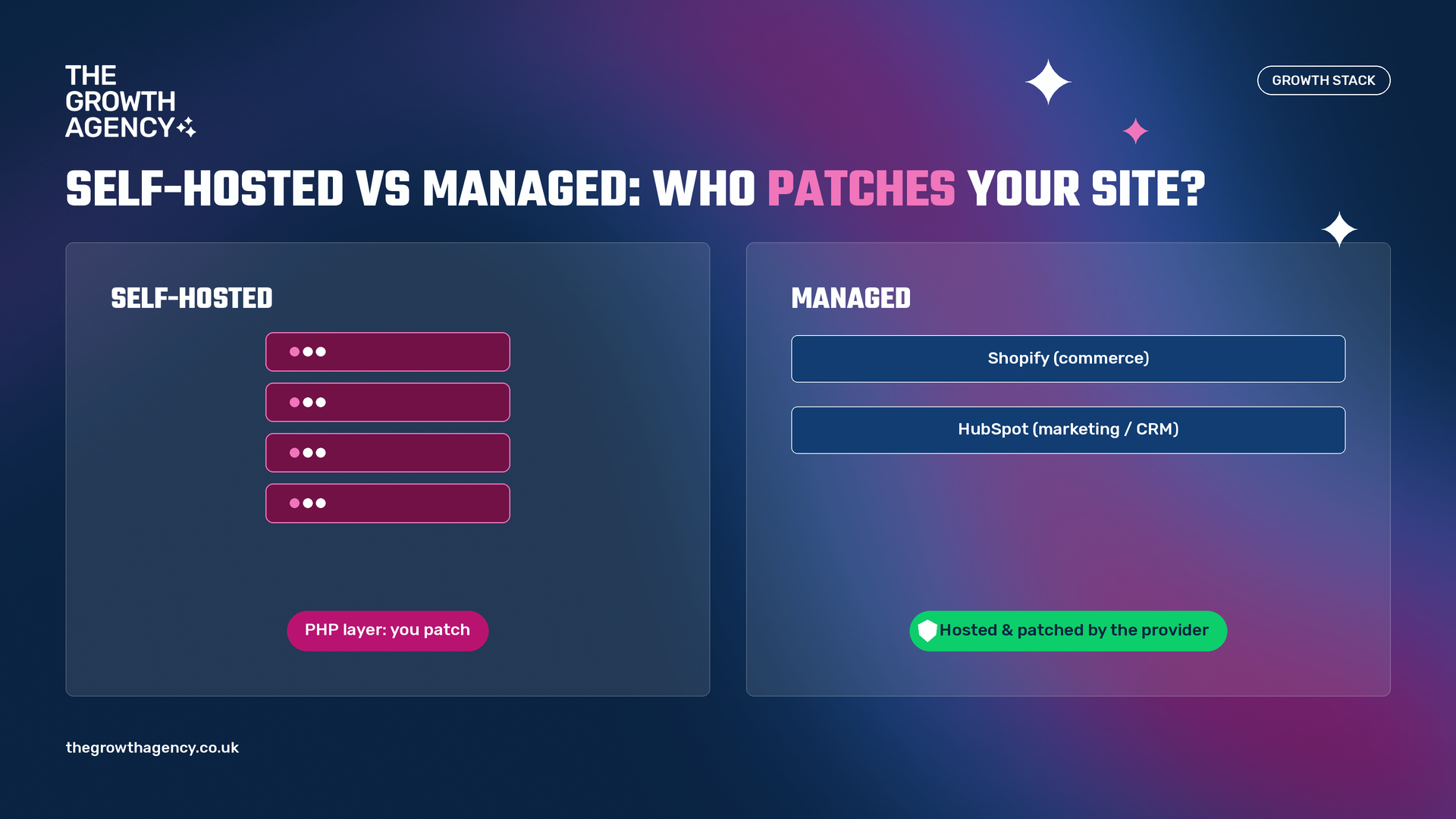
Self-hosted vs managed: who patches what?
This is the real decision. On a self-hosted stack, security guidance is blunt: the store or site owner is responsible for certificates, payment-card compliance where it applies, patching server software and configuring firewalls (Shopify).
On a managed platform, the provider is responsible for hosting, uptime, security patches and core updates (Shopify). That is true whether the platform is commerce-focused or marketing-focused.
Two managed paths we see most often at The Growth Agency:
- Commerce / storefront: Shopify, and Shopify Plus where Plus-level needs apply (B2B, multi-market, custom checkout, high volume).
- Marketing website, CRM and content: HubSpot as a managed alternative to self-hosted WordPress, Drupal or a custom PHP brochure site — CMS, CRM and marketing on one hosted platform.
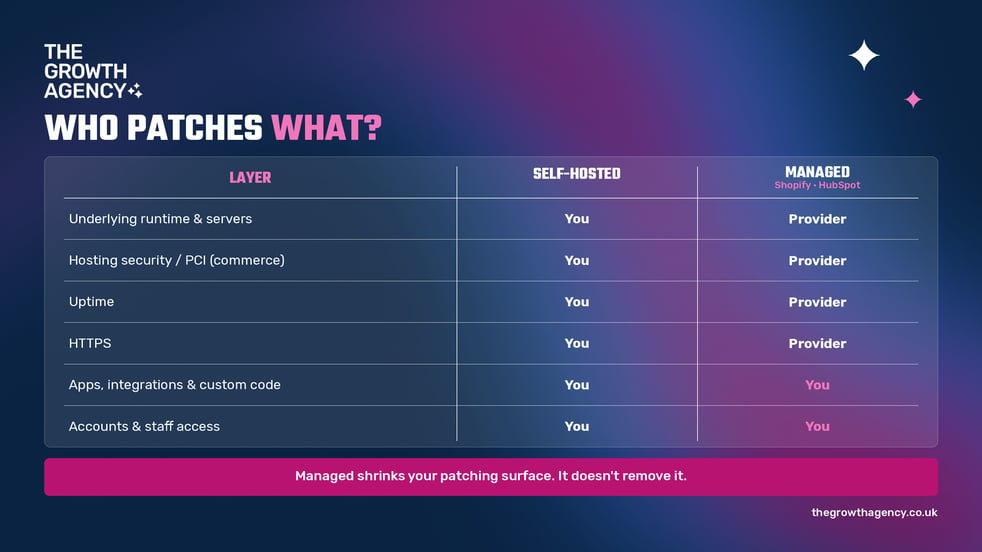
| Self-hosted PHP (WordPress, Magento, Drupal, custom) | Managed platform (Shopify / HubSpot) | |
|---|---|---|
| Who patches the underlying runtime and servers? | You, your developers or your host | The platform provider |
| Payment-card / hosting security (commerce) | Often your responsibility to achieve and maintain | Shopify cites Level 1 PCI DSS by default for storefront, cart and web hosting |
| Uptime and infrastructure | You own servers, scaling and monitoring | Provider manages hosting; Shopify Plus cites 99.9% uptime |
| Certificates (HTTPS) | You source and renew them | Usually provided automatically |
| Apps, integrations and custom code | Yours | Still yours |
| Accounts and staff access | Yours | Still yours |
Shopify also notes regular independent SOC 2 Type II audits (Shopify), and its Shopify Plus platform page cites 99.9% uptime (Shopify). HubSpot similarly hosts CMS Hub and the CRM — your team focuses on content, data quality and how the portal is used.
The trade-off is real: full control, plus every patch and every forgotten server.
Commerce decision? Download our free Shopify Plus Readiness Checklist to score store health, technical red flags and business triggers. Marketing / CRM decision? Grab the HubSpot Onboarding Checklist. Prefer to talk it through? Book a short call.
Does a managed platform protect me from PHP2Shell?
On the infrastructure the provider runs, patching that layer is their job, not yours (Orbit Commerce makes the same point for hosted commerce). The idea applies equally when your marketing site and CRM sit on HubSpot rather than a self-hosted PHP CMS.
But managed does not mean hands-off. You still own account security and staff access; the apps and integrations you install or build; custom theme or template code; fraud operations (for commerce); and privacy and data-quality hygiene. Shopify puts it plainly: it can't protect a store whose admin password is "password123" (Shopify).
And here's what often gets missed. If your ERP connector, B2B portal, middleware or a separate WordPress blog still runs PHP on your own servers, PHP2Shell still applies there. Moving the storefront to Shopify — or the marketing site to HubSpot — shrinks your patching surface. It doesn't remove every self-hosted corner.
Should we leave self-hosting after PHP2Shell?
Not in a panic. Patch first, today. Then make the platform decision on evidence, not fear.
Codilar frames it well: patch, modernise or replatform based on business value and maintenance needs — not fear. A rushed rebuild can look faster and cost more over time.
The useful question isn't "Is self-hosting bad?" It's "Is owning the runtime still worth it for us?" If PHP2Shell was the first time your team mapped every PHP site and connector you run, that tells you something.
How do we decide: Shopify, HubSpot, or both?
This is where The Growth Agency's dual pillar comes in. Many UK teams need a commerce answer and a marketing/CRM answer — and often both.
If the conversation is the storefront, our Shopify Plus Readiness Checklist is built for stores doing roughly £500k–£10m+ online. Start with the risks most migrations underestimate:
- heavy theme customisations that will break on migration;
- more than 15–20 apps with overlapping functions;
- poor product or inventory data hygiene;
- integrations that rely on fragile webhooks or apps.
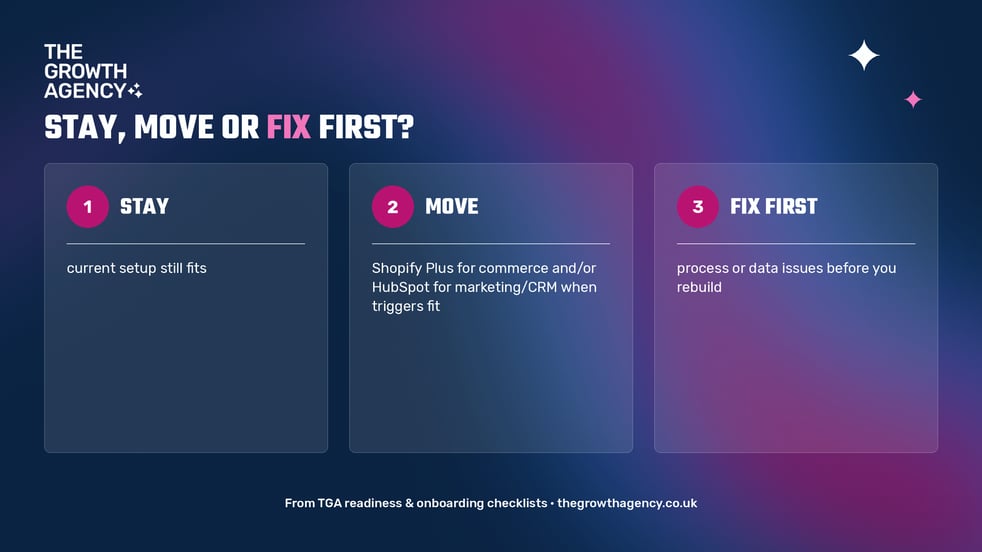
| Your situation | Our recommendation |
|---|---|
| Volume and requirements are still low | Stay on standard Shopify (or another fit-for-purpose commerce setup) |
| 3+ business triggers are present and tech debt is manageable | Move to Shopify Plus |
| Major process or data issues exist | Fix those first, rebuild later |
Business triggers include custom checkout or scripts, B2B/wholesale, multi-market expansion, high volume where Plus SLAs matter, and theme or app limits that block growth. A proper Plus build (theme plus key integrations) typically takes 8–16 weeks and costs £40k–£150k+, depending on complexity.
If the conversation is the marketing website or CRM, self-hosted WordPress or Drupal often carries the same patching burden. HubSpot gives teams a managed CMS, CRM and content stack — and our HubSpot Onboarding Checklist helps you set the portal up with discipline, not as "just another contact list".
When commerce and marketing need to talk, our Shopify–HubSpot–ERP Integration Decision Guide helps you decide what to fix before you move, and why integrating Shopify with HubSpot matters for B2B merchants covers the CRM side.
Key takeaways
- PHP2Shell is a flaw in PHP itself: updating WordPress, Magento or plugins alone is not enough — the hosting layer must be patched.
- On a self-hosted stack, you own every runtime, including ones behind an ERP connector, B2B portal or marketing site.
- Managed platforms (Shopify for commerce; HubSpot for marketing/CRM/content) patch infrastructure; you still own accounts, apps, custom code and integrations.
- Patch first, then decide: stay, move the storefront, move the marketing stack, or fix data and process issues before you rebuild.
Frequently asked questions
What is PHP2Shell?
PHP2Shell is the name for two critical PHP vulnerabilities (CVE-2026-109618 and CVE-2026-109619), disclosed on 21 October 2026. Crafted web requests may allow remote code execution, data exposure from other requests, or denial of service.
Which PHP versions are patched?
Patched releases reported by Vercel include PHP 8.2.35, 8.3.36, 8.4.27 and 8.5.12. On PHP 8.1 or earlier there are no regular updates from the PHP project — move to a supported branch or get a backported fix from your distribution or LTS vendor (Vercel).
Does Shopify or HubSpot protect me from PHP2Shell?
On the infrastructure those platforms run, patching is the provider's job. Any PHP you still run yourself — middleware, an ERP connector, a separate WordPress site — still needs patching.
Should I migrate off self-hosted after PHP2Shell?
Patch the PHP runtime first. Then weigh whether to patch, modernise or replatform based on business value and maintenance effort, rather than rushing a rebuild.
What is the shared responsibility model?
The platform secures hosting, core updates and (for Shopify commerce) PCI scope for storefront and checkout. You own account security, staff access, apps and integrations, custom code, fraud operations where relevant, and privacy compliance.
When is Shopify Plus or HubSpot the right move?
Shopify Plus when three or more commerce business triggers apply and tech debt is manageable. HubSpot when you want marketing site, CRM and content on a managed stack instead of self-hosted PHP. Many teams need both — and the integrations between them.
Ready to choose managed with your eyes open?
PHP2Shell is a reminder that hosting is a business decision, not just a technical one. If you self-host, you own the runtime, the patches and the out-of-hours call. If you move to a managed platform, you hand the infrastructure to the provider and focus your team on the parts only you can secure.
We're a Shopify and Shopify Plus and HubSpot partner for UK teams that need to sell, market and stay in sync. No hard sell: if your current setup is enough, we'll tell you.
Download the Shopify Plus Readiness Checklist or the HubSpot Onboarding Checklist, or book a short call.